Put the chore chart on the TV
A chore chart works only where it is seen, and a parent's phone is the one place a small child never looks. FamilyQuest puts the week on the screen the family already gathers around.
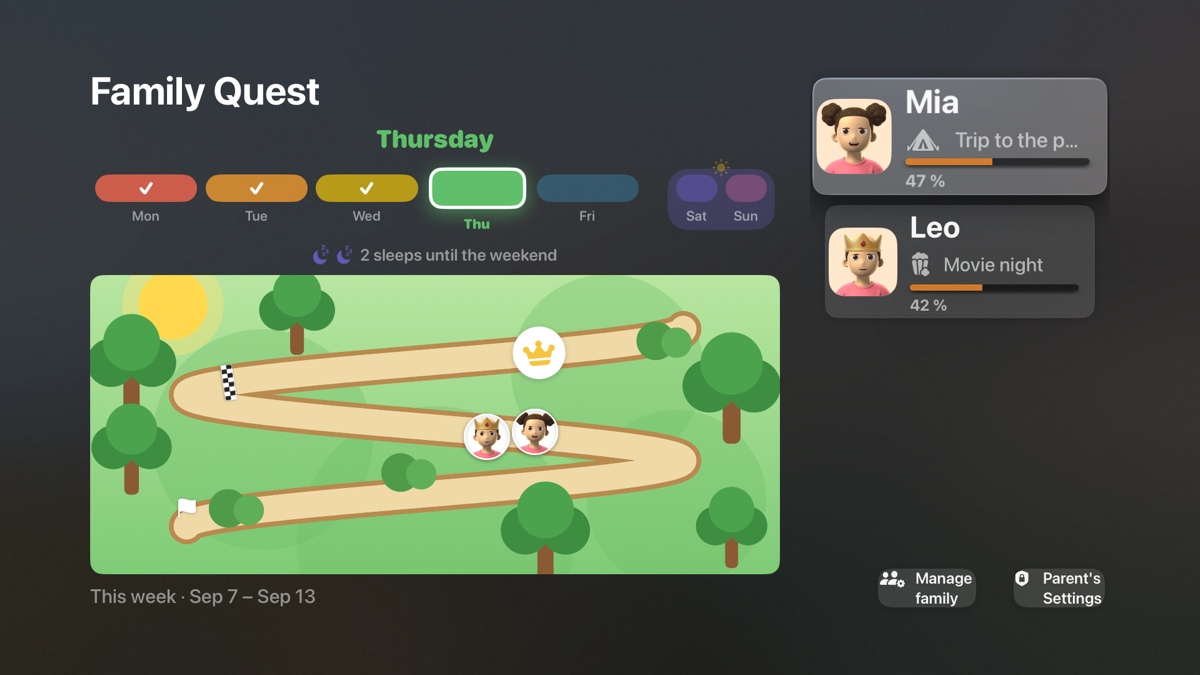
What the television shows
One screen for the whole family: a shared map with every child's avatar somewhere along the path, and a card per child with today's goals. When a goal is ticked — on a phone, or with the remote if you allow it — the avatar moves. At the finish line is the reward the child chose; a little further on, a crown for a great week. Sunday night, the television plays the week's recap.
Set it up from the couch
No phone needed. Start a family on the TV, and it walks you through it in about a minute: the child's name and age, a reward for the week, goals that suit the age already ticked, and an avatar to shuffle until it looks right. A phone or a second parent joins later with a six-digit code.
Where it runs
Apple TV (tvOS 17 or later) and Fire TV — the same family, live, on both. Phones and tablets: iPhone, iPad and Fire tablet, with Android on Google Play in testing. English and Canadian French.
Free. No ads, no subscription, no in-app purchases.
See every screen → or the free printable chart for the fridge
Questions
Is there a chore chart app for Apple TV or Fire TV?
FamilyQuest runs on both, free. The television shows every child’s progress on one screen and, if the parents allow it, goals can be checked off with the remote. It syncs live with the phone and tablet apps.
Why put a chore chart on the TV?
Because a chart works only where it is seen. A parent’s phone is the one place a four-year-old never looks; a paper chart on the fridge works because it is in the room. The television is in the room too, and it is already switched on.
Do I need a phone to set it up on the TV?
No. A family can be created and set up entirely on the television: name, age, the reward, a starter set of goals for that age, and an avatar — about a minute with the remote. A phone can join later with a code.
Does it cost anything?
No. Free on every platform, no ads, no subscription, no in-app purchases.